
Corroded Battery Terminals in Dubai: White and Green Build-Up, Safe Cleaning and When the Cable Must Be Replaced
I have worked on cars all over Dubai for years now, and if there is one small thing that causes a big morning headache, it is this: you turn the key, or you press the start button, and nothing happens. Or the engine turns over so slowly that it sounds tired, like it stayed up all night. You pop the bonnet, you look at the battery, and there it is — a crusty white or green growth sitting on top of the battery terminals, like mould on old bread. Most drivers in Dubai have seen it at least once. Most of them have no idea what it is, whether it is dangerous, or whether they can clean it themselves. So let me explain it the way I explain it to customers standing next to their car in a parking lot in the middle of July.
That white and green build-up is called corrosion. It is not dirt. It is not dust from the road. It is a chemical reaction happening right there on your battery, and in Dubai it happens faster than in most places in the world. The heat, the humidity near the coast, the short trips, the cars that sit parked for weeks while their owners are travelling — all of it works together to grow that crust on your terminals. The good news is that in many cases you can clean it off safely at home with simple things you probably already have in your kitchen. The bad news is that sometimes cleaning is not enough, and if you keep cleaning the same terminals again and again, you are treating the symptom while the real problem eats away at the cable underneath.
I wrote this guide because I see the same story every single week. A driver in JVC or Al Barsha or Deira calls us in the morning because the car will not start. We arrive, we lift the bonnet, and the terminals are covered in white powder and green crust. Ten minutes of proper cleaning and the car starts like new. The driver is happy, and honestly, so am I, because it was a simple fix. But then there are the other calls — the ones where the crust has been growing for months, where the cable underneath has turned green and brittle inside, where the terminal clamp is so eaten away that it will not tighten no matter what you do. Those cars need a new cable, or a new battery, and no amount of cleaning will bring them back. The difference between those two situations is what this article is about.
By the time you finish reading, you will know exactly what that build-up is, why Dubai makes it worse, what symptoms to watch for, how to tell the difference between corroded terminals and a dead battery, and how to clean the terminals safely step by step without hurting yourself or your car. You will also know the warning signs that mean you should stop, leave it alone, and call for help — because a cracked or swollen or leaking battery is not a do-it-yourself job, and I would rather you read that warning here than learn it the hard way next to your car. And if cleaning is not the answer for your car, you will know what needs replacing and why, so nobody can sell you parts you do not need.
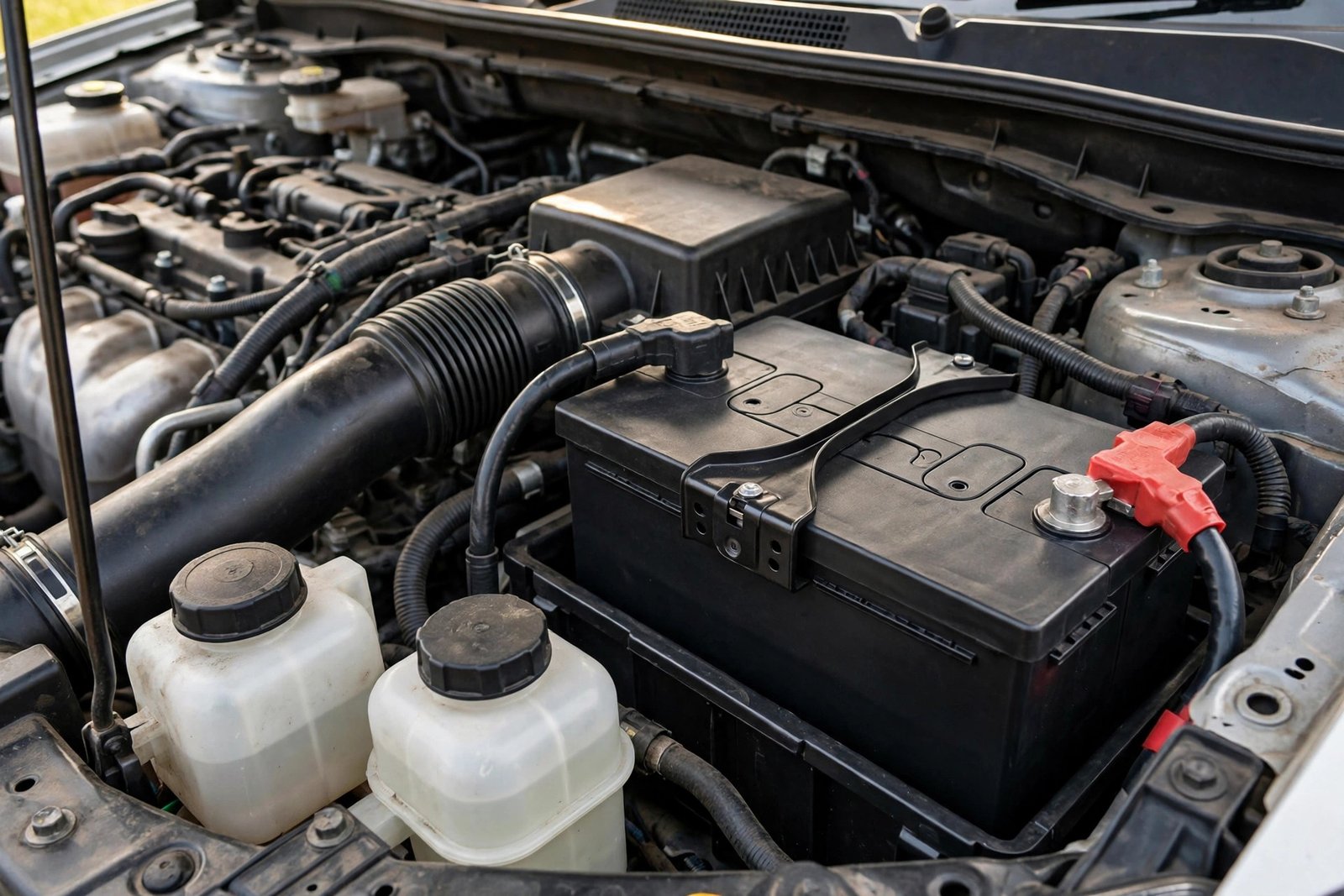
One thing before we start. Your car battery is the heart of the electrical system. Everything — the starter motor, the lights, the air conditioning, the dashboard, the central locking — runs off it, or through it. The terminals are the two connection points on top of the battery where the thick cables from your car attach. One is positive, marked with a plus sign and usually a red cover. The other is negative, marked with a minus sign and usually a black cover. When those connections are clean and tight, electricity flows freely and your car starts the way it should. When they are covered in corrosion, electricity has to fight its way through a layer of crust, and that fight is what causes the slow crank, the clicking, the dim lights, and all the other symptoms we are about to talk about. It really is that simple. A dirty connection is a weak connection, and a weak connection makes a healthy battery look dead.
What That White and Green Stuff Actually Is
Let me start with the plain truth, because most of the explanations you find online are full of chemistry words that do not help anyone standing next to a car. Your car battery is full of acid. Inside it, there is a liquid — battery acid — that makes the chemical reaction that stores and releases electricity. The battery is sealed, but it is not perfectly sealed. Over time, tiny amounts of acid vapour escape from around the terminals, especially in heat. That vapour meets the metal of the terminals and the cable ends, and the two react. The result is the crusty stuff you see.
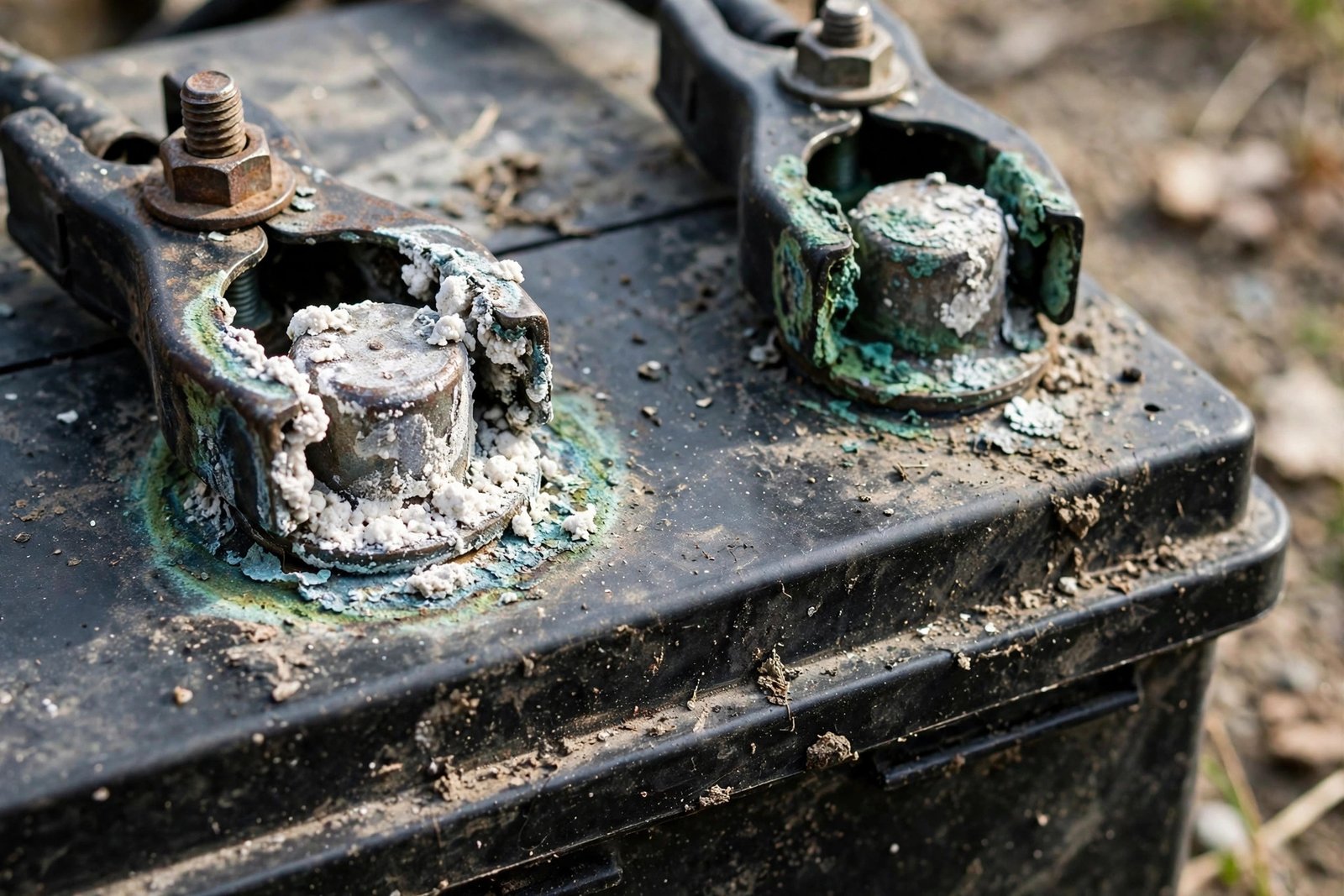
The white powdery build-up is the most common thing you will see in Dubai. It usually forms on the negative terminal, the one with the minus sign and the black cover. It looks like white dust, or white flakes, or a thick white crust that grows up around the clamp like frost. If you touch it — and please do not touch it with bare hands, we will get to that — it feels dry and powdery, and it crumbles easily. It is a lead compound, made when the acid vapour reacts with the lead in the terminal. Lead is the metal your battery terminals are made from, and it is soft, which is why the crust forms so easily on it.
The green or blue-green build-up is the other kind, and it usually forms on the positive terminal, the one with the plus sign and the red cover. It looks different — more like a green-blue crust, sometimes almost turquoise, sometimes a darker green. It can look wet or sticky even when it is dry. This one comes from the acid vapour reacting with the copper in the cable. The thick cables that connect to your battery have copper inside them, and when the acid reaches that copper, it turns green. If you have ever seen an old copper roof or an old copper coin turn green, it is the same idea. Copper plus acid plus air plus time equals green crust.
Sometimes you will see both colours on the same battery, and sometimes you will see a blue tint as well. The blue usually means the copper reaction has gone further. None of these colours is a good sign on its own, but the colour does tell you something useful: white usually means the lead terminal is reacting, and green or blue usually means the copper in the cable is involved. When the green starts creeping down the cable, away from the terminal and under the plastic coating, that is a warning that the corrosion has gone deeper than the surface. I will come back to that, because it is one of the most important things in this whole article.
Now, is this stuff dangerous? Let me be honest with you. In small amounts, on the outside of the battery, it is not going to hurt you just by being there. It is not radioactive, it is not going to explode on its own, and it is not going to jump off the battery and bite you. But it is not harmless either. It is acidic, which means it can irritate your skin, sting badly if it gets in your eyes, and damage your clothes. That is why you wear gloves and eye protection when you clean it, every single time, no exceptions. And if the battery itself is cracked, swollen, or leaking liquid, that is a different situation entirely, and you should not touch it at all. We will talk about that in the safety section.
What the build-up does to your car is simple and mechanical. Electricity needs a clean metal-to-metal connection to flow properly. Corrosion sits between the terminal and the cable clamp like a wall. It is a poor conductor, which means electricity struggles to get through it. Think of it like a water pipe that is half blocked with limescale. The water still gets through, but slowly, and with much less force. Your starter motor is the thirstiest thing in your car — it needs a huge rush of electricity all at once to turn the engine over. When corrosion blocks that rush, the starter turns slowly, or it clicks, or it does nothing at all. Your lights dim because they are not getting full power either. Your dashboard flickers. Everything electrical in the car starts behaving strangely, and the cause is often just that crusty layer sitting on top of the battery.
The frustrating part is that the battery itself is often perfectly fine underneath all of this. I have lost count of the number of times a driver has told me they were about to buy a new battery, and all the car needed was a proper clean of the terminals. A new battery on top of corroded cables is like putting new shoes on dirty socks — it might feel better for a day, but the problem is still there. That is why checking the terminals is always the first thing I do when a car will not start. It costs nothing to look, and it can save you from spending money on a battery you did not need.
One more thing worth knowing: corrosion does not happen overnight. It builds up slowly, a little bit at a time, week after week. That is why most drivers do not notice it until the car will not start. The car starts a little slower each morning, but so slowly that you get used to it. The lights are a little dimmer, but you drive in daylight and never notice. Then one hot afternoon, or one morning after the car has sat for a few days, the build-up finally crosses the line and the car refuses to start at all. If you check your terminals every couple of months — just lift the bonnet and look — you will catch it early, when it is a five-minute clean instead of a morning without a car.
Why Dubai Makes Corrosion Worse
If you have lived in Dubai for a while, you already know the summer heat here is not like heat anywhere else. It is not just hot — it is hot for months without a break, and it stays hot even at night. Your car sits in that heat all day, and the battery sits in that heat too, under the bonnet, in an engine bay that gets far hotter than the air outside. I have opened bonnets in August where the heat hits your face like an oven door. That heat does two things to your battery, and both of them make corrosion worse.
First, heat speeds up every chemical reaction, including the one that makes corrosion. The acid inside the battery becomes more active when it is hot. More acid vapour escapes from around the terminals. More vapour means more reaction with the metal, which means more crust, faster. A battery that might take a year to grow a light dusting of corrosion in a cool climate can grow a thick crust in a few months here. This is not a theory — I see it every summer. June, July, August, September: those are the months when the corrosion calls spike. Cars that were fine in March are suddenly struggling in August, and the terminals tell the story.
Second, heat makes the battery lose water. The liquid inside the battery slowly evaporates in high temperatures, and as the level drops, the acid becomes more concentrated. More concentrated acid means a stronger reaction at the terminals. This is also why batteries in Dubai often do not last as long as the same battery would last in a cooler country. The heat is quietly working against them from the day they are fitted. There is nothing you can do about the weather, but understanding it helps you understand why checking your terminals regularly matters so much more here than it would somewhere cooler.
Then there is the humidity. Dubai is a coastal city, and for much of the year the air holds a lot of moisture, especially in the mornings and near the coast in places like Jumeirah, Marina, and Deira. Moisture in the air settles on cool metal surfaces, including your battery terminals, and water plus acid vapour plus metal is exactly the recipe for corrosion. You might notice it most after a humid night — a fine layer of moisture on everything under the bonnet, and over time, that moisture feeds the crust. Even the sea air itself plays a part. Salt in the air is corrosive to metal in general, and while your battery is under the bonnet and not sitting on the beach, the salty, humid air still finds its way in through the gaps around the bonnet and the grille. It is a small effect compared to the heat, but it adds up over months and years.
Short trips make it worse too, and Dubai is a city of short trips. You drive to the grocery store, you drive the kids to school, you drive to the mall — each trip is short, the engine barely warms up, and then you switch off and the car sits. Here is why that matters: every time you start the car, the battery gives a big burst of energy to the starter motor. The alternator — the part that recharges the battery while you drive — then needs time to put that energy back. On a short trip, it never gets enough time. The battery spends much of its life slightly undercharged, and an undercharged battery in hot weather produces more of the gases that cause corrosion. It is a quiet cycle, and most drivers never connect their driving pattern to the crust on their battery. But if your daily driving is mostly short hops around your neighbourhood, your terminals need checking more often, not less.
Cars parked for weeks are another big Dubai story. So many people here travel for the summer, or they have a second car that sits in the basement parking for weeks at a time. A parked car is not a resting car — the battery is still slowly losing charge to the alarm system, the clock, the onboard computer, and all the small electronics that never fully switch off. As the battery discharges slowly in the heat, the chemical balance inside it changes, and corrosion grows faster on the terminals. I have opened bonnets on cars that sat for a month and found terminals covered in white crust that was not there before the trip. If you are going away for a few weeks, it is worth having someone start the car and let it run for a while, or at least checking the terminals when you come back before you assume the battery is dead.
There is also the dust and sand. Dubai is a desert city, and fine dust gets everywhere, including under the bonnet. On its own, dust is not corrosion. But dust mixed with moisture and acid vapour forms a paste that holds the corrosive stuff against the metal for longer. It is like a wet cloth left on a piece of steel — the longer it stays damp and in contact, the more damage it does. A clean engine bay is not just about looking nice. Keeping the area around the battery reasonably clean and dry actually slows corrosion down. You do not need to wash the engine bay with a hose — in fact, please do not do that, because water forced into the wrong places causes its own problems — but wiping the top of the battery with a dry cloth now and then is a small habit that pays off.
Finally, there is the simple fact that many cars in Dubai are driven hard by the air conditioning. The air conditioning is on almost every time you drive, and it puts a heavy load on the electrical system. The alternator works harder, the battery works harder, and the whole charging system runs hotter. Heat, again, is the theme of this whole section. Everything in Dubai pushes the battery towards running hot, and a hot battery corrodes faster. You cannot change the climate, you cannot stop using the air conditioning, and you should not feel guilty about short trips. But you can check your terminals regularly, and that one habit cancels out most of what the Dubai climate is doing to your battery.
I tell customers to check their battery terminals at least once every two months in Dubai, and once a month during the peak summer. It takes less time than filling up with fuel. Just lift the bonnet, look at the two terminals, and ask yourself: is there white powder, green crust, or any build-up at all? If the metal is clean and shiny, close the bonnet and carry on with your day. If there is crust, clean it using the steps later in this article, or call us and we will do it for you. Catching it early is the whole secret. A thin dusting cleans off in minutes. A thick crust that has been growing for a year is a different job entirely.
The Symptoms: How Corroded Terminals Show Up in Daily Driving
Corroded terminals do not usually fail all at once. They fail gradually, and the symptoms creep up on you so slowly that you get used to them. That is what makes them tricky. Let me walk you through the symptoms one by one, in the order most drivers notice them, so you can recognise them in your own car.
The first symptom is usually a slow crank. You turn the key or press the start button, and the engine turns over, but slowly — rrr-rrr-rrr instead of the quick, confident vroom you are used to. It might still start, but it sounds tired, like the car is struggling. Many drivers tell me they thought the battery was just getting old. Sometimes it is. But very often, the battery is fine and the corrosion is choking the power before it reaches the starter motor. The starter needs a huge rush of electricity in one short burst, and corrosion is like a narrow doorway that the electricity has to squeeze through. Less electricity gets through, the starter turns more slowly, and the engine takes longer to catch. If your car has started sounding tired in the mornings, check the terminals before you assume anything else.
The second symptom is clicking. You turn the key and you hear a fast clicking sound — click-click-click-click — but the engine does not turn over at all. Or you hear one single loud click and then nothing. That clicking is the starter solenoid, which is a small switch that connects the battery to the starter motor. It needs a certain amount of power to work properly. When corrosion blocks the power, the solenoid clicks but cannot hold the connection, so it clicks again and again. Drivers often panic when they hear this, and I understand why — it sounds serious. But in many cases it is just the terminals. Clean them, tighten them, and the clicking stops. Of course, clicking can also mean a genuinely dead battery or a failed starter, which is why I have included a whole section later on telling the two apart.
The third symptom is dim lights. You might notice that your headlights are not as bright as they used to be, especially at idle — when the car is sitting still with the engine running. Or the interior lights seem dimmer. Or the dashboard lights flicker. Lights are very sensitive to voltage, which is the pressure of the electricity flowing through the car. Corrosion drops the voltage before it reaches the lights, so they shine less brightly. A simple test: start the car at night, turn the headlights on, and watch them while someone else revs the engine gently. If the lights get noticeably brighter when the engine revs up, that can point to a connection or charging problem. It is not proof on its own, but it is a clue, and combined with crusty terminals, it paints a clear picture.
The fourth symptom is flickering electrics. The dashboard lights flicker. The radio cuts out for a second and comes back. The power windows move slowly, or they stop halfway and then start again. The air conditioning fan changes speed on its own. These are all signs that the electrical system is not getting a steady supply of power. A corroded terminal does not just reduce the power — it makes the connection unstable. The clamp might be making good contact one moment and poor contact the next, especially when the car vibrates as you drive over a bump or a speed hump. That on-again, off-again connection is what makes the electrics flicker and misbehave. Modern cars are full of sensitive electronics, and they do not like an unstable power supply at all. If your dashboard is doing strange things and the battery terminals look crusty, start there before you worry about expensive electronic faults.
The fifth symptom is the car not starting at all. This is the one that gets most people to call us. You turn the key, nothing happens — no crank, no click, maybe just the dashboard lights coming on dimly, or nothing at all. Or the car started fine yesterday and today it is completely dead. Corrosion can cause this when the build-up finally gets thick enough to block the connection almost completely. It is also possible for the connection to be fine when the car is cold in the morning and then fail when the engine bay heats up, because metal expands with heat and a loose, corroded clamp can lose contact entirely. That is why some cars start fine in the morning and refuse to start after a drive in the afternoon heat. It feels random, but there is a reason for it, and the reason is often sitting right on top of the battery.
The sixth symptom is a little more subtle: the car starts, but the battery never seems to hold its charge properly. You jump-start the car, you drive it for a while, and the next morning it is flat again. Drivers usually blame the battery, and sometimes they are right. But corrosion can cause this too, because the alternator — the part that charges the battery while you drive — sends its charge back through the same terminals. If the terminals are corroded, the charge cannot get into the battery properly. You drive for an hour, but the battery only receives part of the charge it should have received. Over days and weeks, the battery gets weaker and weaker, not because it is faulty, but because it is never being fully recharged. This is one of the most misunderstood symptoms. People replace the battery, and the new battery starts going flat too, because nobody cleaned the terminals or replaced the eaten cable. Always check the connection before you blame the battery.
The seventh symptom is a strange smell, or visible damage around the battery. If you smell something sharp and sour near the battery — a bit like rotten eggs — that can be a sign that the battery is overcharging or leaking gas, and you should not ignore it. If you see the battery case bulging, or the sides swelling outwards, or any liquid leaking from the battery, stop. Do not try to clean it. Do not try to jump-start it. Call for help. A swollen or leaking battery is not a cleaning job; it is a safety issue, and it needs to be handled by someone who knows what they are doing. I will say this again in the safety section, because it is that important.
Finally, there is the symptom that is not really a symptom at all: you look under the bonnet and you see the crust. That is the most reliable sign of all. You do not need to wait for the car to struggle. If you can see white powder or green crust on the terminals, the corrosion is already affecting the connection, even if the car still starts fine today. Clean it now, while it is easy, and you will probably never experience the other symptoms on this list. That is the whole point of this article — to help you catch it early, when the fix is simple and safe.
One thing I want to be clear about: these symptoms overlap with other problems. A dead battery, a failing alternator, and a worn-out starter motor can all cause slow cranking, clicking, and dim lights. Corroded terminals are the most common and the cheapest cause, and they are the easiest to check, which is why I always start there. But if you clean the terminals properly and the symptoms are still there, do not keep cleaning and hoping. That is the moment to get the battery and the charging system tested properly, which we will cover later in this article.
How to Tell Terminal Corrosion From a Dead Battery
This is the question I get asked more than any other on this topic, and it is a good question, because the symptoms are almost identical. A corroded terminal and a dead battery both cause slow cranking, clicking, dim lights, and a car that will not start. Telling them apart matters, because the fix is completely different. Cleaning terminals costs almost nothing. Replacing a battery that is still healthy is money wasted. So here is how I tell them apart when I arrive at a car, and how you can do the same at home.
Start with your eyes. Lift the bonnet and look at the battery terminals. If you can see white powder, green crust, or blue build-up on the terminals or the cable clamps, corrosion is at least part of the problem. It might not be the whole problem — a battery can be both corroded and weak at the same time — but if the crust is there, it needs cleaning before you can judge anything else. A battery with clean, shiny terminals and tight clamps that still will not start the car is a different story from a battery buried under a thick white crust. Always look first. It is the simplest test there is, and it costs nothing.
Next, try the lights test. Turn the headlights on — or, if the car will not start, turn the interior lights on — and look at how bright they are. Then try to start the car while you watch the lights. If the lights are reasonably bright when you first switch them on, but they go very dim or go out completely the moment you try to start the engine, that can point to a connection problem, including corrosion. The lights are telling you that the battery has power, but the power is not getting through properly when the starter asks for a big gulp of it. On the other hand, if the lights are very dim from the start, or they do not come on at all, the battery itself is more likely to be flat or dead. This is not a perfect test — it is a clue, not a diagnosis — but combined with what you see on the terminals, it is very useful.
Now think about the history. How old is the battery? Most car batteries in Dubai last around two to three years because of the heat, though some last longer and some fail sooner. If your battery is less than two years old and the terminals are crusty, corrosion is the more likely culprit. If the battery is four or five years old, has been struggling for weeks, and the terminals are clean, the battery itself is the more likely problem. Age is not proof either — I have seen batteries fail in their first year and batteries last five years — but it is a piece of the puzzle, and it helps you decide what to check first.
Think about what happened before the problem started. Did the car sit parked for a few weeks while you were travelling? Did the problem appear suddenly after a hot day? Did the car start slowly for a week or two before it finally refused? A slow decline over days or weeks fits corrosion, because corrosion builds up gradually. A sudden failure overnight, especially after the car was fine the day before, can still be corrosion — a clamp can lose contact suddenly when the build-up reaches a tipping point — but it can also be a battery that has finally given up, or something draining the battery overnight. If you left the lights on, or a door was not closed properly, or a phone charger was left plugged in, a flat battery is the first thing to suspect.
The jump-start test is another useful clue, but you need to read it carefully. If someone jump-starts your car and it starts immediately and runs fine, then starts fine again the next morning, the battery was probably just flat — maybe from short trips, maybe from sitting, maybe from something left on. If the car starts with a jump but is flat again the next morning, even after a decent drive, the battery may not be holding its charge, or the terminals may be so corroded that the alternator cannot recharge the battery properly while you drive. And if the car will not start even with a jump, and the terminals are covered in crust, the connection may be so bad that even the jump-start power cannot get through. In that case, cleaning the terminals first and then trying the jump again often works. I have done this many times at the roadside: clean the terminals, connect the jump leads properly, and the car fires up straight away.
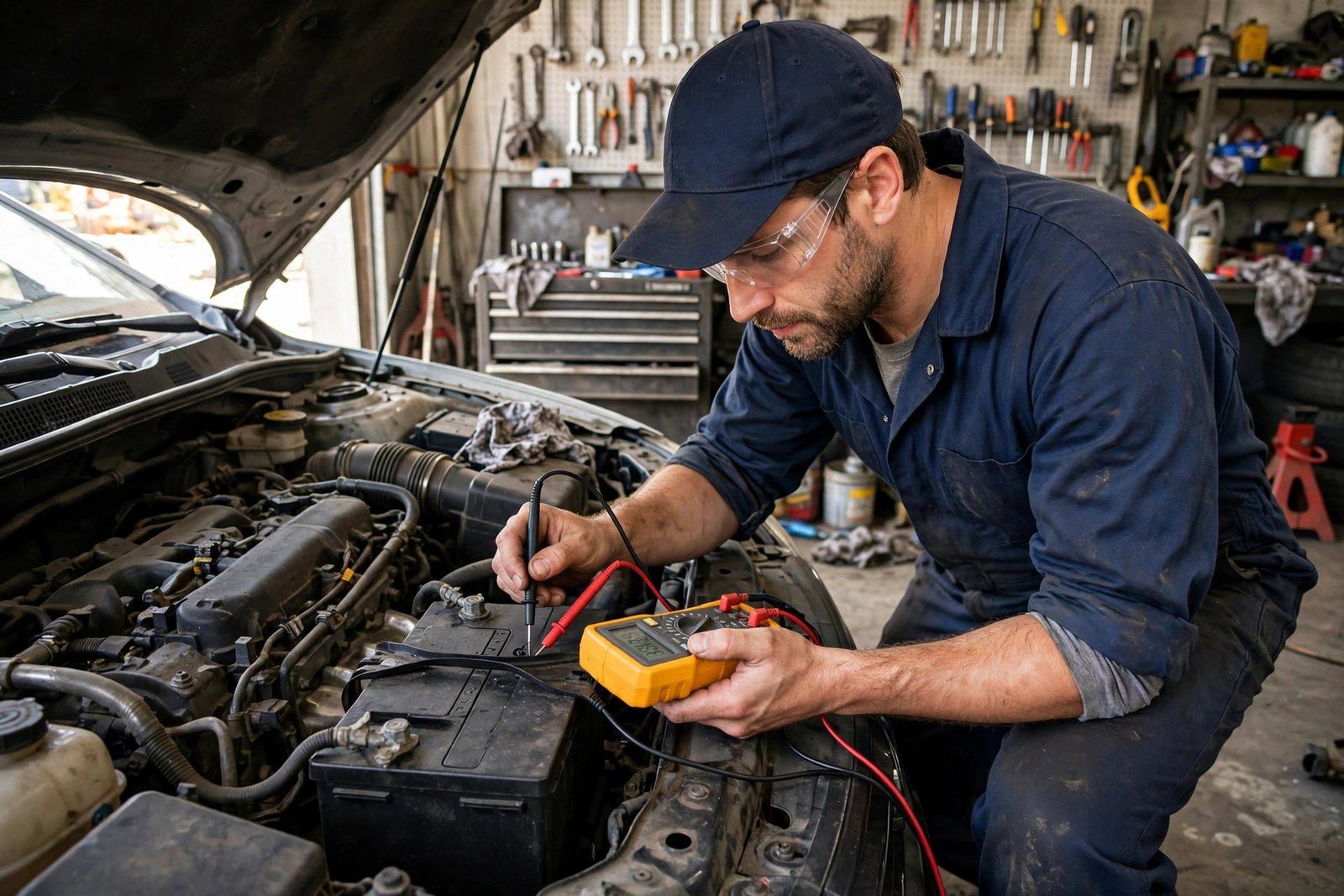
The most reliable way to tell the difference is a proper battery test, and this is something we do on every battery call. A battery tester — a small device that checks the voltage and the health of the battery — can tell you in less than a minute whether the battery itself is healthy, weak, or dead. A multimeter can do a basic version of the same check. I have a full section on testing later in this article, because it matters. But even without any tools, the combination of what you see on the terminals, how the lights behave, and the history of the problem will point you in the right direction most of the time.
Here is my honest advice: if the terminals are corroded, clean them first, properly, following the steps in this article. Then see how the car behaves for a few days. If it starts strongly, the lights are bright, and the problem is gone, you have found your answer and it cost you almost nothing. If the car still struggles after a proper clean, or the problem comes back quickly, the battery or the charging system needs testing. Do not keep buying new batteries and hoping. Test first, replace only what is actually faulty. That is how you avoid wasting money, and it is how a good mechanic works.
If you are not sure, or you do not have the tools to test the battery, that is exactly what our mobile car battery replacement in Dubai service is for — we come to you, we test the battery properly, we clean the terminals, and we only replace the battery if the test shows it actually needs replacing. You can also read our guide on car won't start — battery, alternator or starter if you want to understand the wider picture, because sometimes the problem is not the battery at all.
Is It Safe to Drive With Corroded Terminals?
This is a sensible question, and the honest answer is: it depends on how bad the corrosion is. A light dusting of white powder on one terminal, with the car starting normally and the lights bright, is not an emergency. You can drive the car, but you should clean the terminals as soon as you can — this weekend, not next month. The corrosion will only get worse, and the day it leaves you stranded is the day you will wish you had cleaned it earlier. Think of it like a small leak in a tyre. You can drive on it for a while, but you would not plan a long trip on it without fixing it first.
If the car is starting slowly, or the lights are dim, or the electrics are flickering, you should be more careful. The car might start fine in the morning and then refuse to start after you stop at the mall or the petrol station. That is the real risk — not that the car will break down while you are driving, but that it will not restart after you switch it off. I have had customers call us from petrol stations, from mall car parks, and from outside their office, all with the same story: the car drove fine, they switched it off, and now it will not start again. If your car is already showing symptoms, do not take it on a long trip, do not drive it to a remote area, and do not switch it off somewhere you would not want to be stuck. Get the terminals cleaned first.
There is also a safety angle that most people do not think about. A poor battery connection can make the car stall in some cases, especially at low speed or at idle, because the electrical system is not getting a steady supply of power. A stall at a traffic light is embarrassing. A stall while you are turning across traffic is dangerous. It does not happen often, but it does happen, and it is another reason not to ignore the problem once the symptoms have started. Your car needs a reliable electrical supply to run safely, and corroded terminals undermine that reliability.
What about the risk of fire? Let me be straight with you, because I do not want to scare you and I do not want to underplay it either. Corrosion itself does not usually cause fires. But a loose, corroded connection can create heat where the electricity is struggling to get through — the same way a loose plug in a wall socket can get hot. In extreme cases, with a very loose clamp and a lot of corrosion, that heat can damage the cable or the battery. It is rare, but it is real, and it is one more reason to keep the terminals clean and tight. If you ever see melted plastic around the battery, or smell burning near the battery, or see smoke, do not try to drive the car and do not try to clean it yourself. Switch everything off, step away, and call for help.
So the short answer is this: light corrosion with no symptoms — drive, but clean it soon. Corrosion with symptoms — clean it before your next long drive, and do not switch the car off somewhere remote until you have. Heavy corrosion, a swollen or leaking battery, a burning smell, or visible damage — do not drive it, do not touch it, call for help. That is the safe way to think about it, and it will keep you out of trouble.
What You Need Before You Start Cleaning
Cleaning battery terminals is a simple job, but it is a job you should prepare for properly. I have seen too many people start with bare hands, no eye protection, and the wrong tools, and then wonder why their hands are stinging and their eyes are watering. Ten minutes of preparation saves you from all of that. Here is exactly what you need, and why each thing matters.
First, safety gear. You need a pair of gloves — rubber gloves, household cleaning gloves, or proper work gloves. Not thin plastic food bags, and not bare hands. The corrosion is acidic and it irritates the skin, and the build-up can hide sharp edges on the corroded metal underneath. You also need eye protection — safety glasses, or even ordinary sunglasses if that is all you have, though proper safety glasses are better. The reason is simple: when you brush the crust off, tiny particles fly up, and if one lands in your eye, it stings badly. I wear glasses every time I do this job, and so should you. If you wear contact lenses, eye protection is even more important, because getting acidic dust under a contact lens is very painful.
Second, you need baking soda — the same baking soda you use in the kitchen for baking, also called bicarbonate of soda. This is the hero of the whole job. Baking soda is alkaline, which is the opposite of acidic, so when it meets the acidic corrosion, it neutralises it. You will see it fizz when it touches the crust, and that fizzing is the acid being neutralised. You will mix it with water to make a paste, and you will also use it in a cleaning solution. If you do not have baking soda at home, you can buy it at any grocery store in Dubai for very little money. Do not use anything stronger, and do not use a harsh chemical cleaner — baking soda and water is the right combination, and it is gentle enough to be safe while strong enough to do the job.
Third, you need clean water — a jug or a bottle of plain water. You will use it to mix with the baking soda and to rinse the terminals afterwards. Keep the water in a container you can pour from carefully, not a running hose, because you want to control exactly where the water goes. You do not want to flood the engine bay with water. A small jug is perfect.
Fourth, you need a wire brush. A proper battery terminal brush is best — it is a small brush with stiff wire bristles, shaped to fit around the terminal post and inside the cable clamp. You can find one at any auto parts shop in Dubai, and it costs very little. If you do not have one, an old toothbrush with stiff bristles can work for light build-up, and a small wire brush from a hardware store works too. What you need is something with stiff bristles that can scrub the crust off the metal without damaging it. Do not use a steel wool pad that sheds fibres everywhere, and do not use sandpaper on the terminals — sandpaper removes the soft lead along with the corrosion, and that makes the terminal thinner and the connection worse over time.
Fifth, you need the right spanners — the small wrenches that fit the nuts on the battery terminal clamps. Most cars in Dubai use a 10-millimetre spanner for the terminal nuts, but some use a different size, so check your car before you start. An adjustable spanner works fine if you do not have the exact size. You will use the spanner to loosen the clamps so you can take them off the terminals, and to tighten them again afterwards. Do not use pliers if you can avoid it — pliers slip, they damage the soft nuts, and they can round off the corners so the nut will not come off next time.
Sixth, you need a clean, dry cloth or some old rags. You will use them to wipe the terminals dry after rinsing, and to wipe up any spills. The terminals must be completely dry before you reconnect them, because moisture left on the terminals invites the corrosion straight back. A dry cloth is also useful for wiping the top of the battery clean.
Seventh, you need some protective grease for after the cleaning — petroleum jelly is the classic choice, and it works very well. A thin layer of petroleum jelly on the terminals after you reconnect them seals the metal away from the air and the acid vapour, and slows the corrosion down dramatically. Some auto parts shops also sell special battery terminal grease or anti-corrosion spray, and those work well too. What matters is that you put a protective layer on clean metal. Do not skip this step. Cleaning without protecting is like washing your car and then parking it under a dripping pipe — it will be dirty again before long.
Eighth, you need a safe place to work. Park the car on flat ground, switch the engine off, take the key out of the ignition, and make sure the handbrake is on. Work in daylight, or with a good torch, so you can see what you are doing. Work outdoors or in a well-ventilated area — a car park or a driveway, not a closed garage with the door shut — because batteries can give off gas, and you want fresh air around you. Keep children and pets away from the car while you work. And keep any food or drink away from the work area, because you do not want to transfer acidic residue to your mouth or your food.
One last thing before you start: take a photo of the battery with your phone before you disconnect anything. Take a photo that clearly shows which cable goes to which terminal — the red cable to the positive terminal with the plus sign, and the black cable to the negative terminal with the minus sign. This takes five seconds and it can save you from a very expensive mistake. Connecting the cables the wrong way round can damage your car's electronics seriously, and a photo is your safety net. I take photos of every battery I work on, even after years of doing this job, because it costs nothing and it removes all doubt.
How to Clean Battery Terminals Safely, Step by Step
This is the heart of the article, so I am going to walk you through it slowly, one step at a time, exactly the way I would do it if I were standing next to your car. Do not rush it. Read the whole section first, get everything ready, and then work through the steps in order. The order matters, especially the order you disconnect and reconnect the cables, because getting that wrong can cause a short circuit or damage your car.
Step one: park safely and prepare. Park the car on flat ground, switch the engine off, remove the key from the ignition, and put the handbrake on firmly. If your car has a push-button start, make sure the car is fully off — no dashboard lights, no accessories running. Open the bonnet and prop it securely. Put on your gloves and your eye protection now, before you touch anything. Take your photo of the battery showing which cable goes where. Look at the battery carefully before you touch it: is the case cracked? Is it swollen or bulging? Is there liquid leaking from it? Is there any melted plastic or a burning smell? If you see any of those things, stop right here. Do not disconnect anything. Do not try to clean it. Close the bonnet and call for help. A damaged battery is not a cleaning job, and I would rather you lose a morning than hurt yourself.
Step two: disconnect the negative cable first. This is the most important safety rule in the whole job, so let me explain why. The negative terminal is the one with the minus sign, usually with a black cover and a black cable. The positive terminal is the one with the plus sign, usually with a red cover and a red cable. You always disconnect the negative cable first, and you always reconnect it last. The reason is that the negative cable is connected to the body of the car — the metal of the car itself. If your spanner touches the positive terminal and the metal body of the car at the same time while the negative cable is still connected, you create a short circuit: a huge rush of electricity with nowhere safe to go. It can spark violently, it can weld the spanner to the car, it can damage the battery, and it can burn you. If the negative cable is already disconnected, that circuit is broken, and the same accident cannot happen. So: negative first, always. Loosen the nut on the negative clamp with your spanner — turn it anticlockwise — just enough that the clamp is loose. Then gently twist the clamp and lift it off the terminal post. If it is stuck, do not force it and do not lever it with a screwdriver, because you can crack the battery case. Twist it gently from side to side while you pull upwards, and it will come free. Once it is off, push the cable to one side so it cannot accidentally touch the terminal again, and tuck it somewhere safe.
Step three: disconnect the positive cable. Now that the negative cable is safely out of the way, loosen the nut on the positive clamp — the one with the plus sign and the red cover — in the same way. Twist gently and lift it off the terminal post. Push this cable to the other side so it cannot touch anything metal. Now both cables are disconnected, the battery is isolated, and you can work safely. Take a moment to look at the cable ends. The inside of each clamp should be clean, shiny metal. If the inside is covered in white or green crust, or the metal looks eaten away, thin, or pitted, make a note of it — we will talk about what that means later.
Step four: mix your cleaning paste. Take a small bowl or an old cup and put in two or three spoonfuls of baking soda. Add a small amount of clean water — just enough to make a thick paste, about the consistency of toothpaste. Stir it with an old spoon or a stick. You do not need to be precise about this. If the paste is too runny, add a little more baking soda. If it is too dry, add a few drops of water. You will also want a separate jug with a baking soda solution for rinsing later — a spoonful or two of baking soda in a jug of water, stirred until it dissolves. Having both ready before you start scrubbing makes the job much smoother.
Step five: apply the paste and let it work. Using an old toothbrush or a small brush, spread the baking soda paste over the corroded areas — on top of the battery terminals, around the base of the terminals, and on the inside and outside of the cable clamps. You will see it start to fizz and bubble where it touches the corrosion. That fizzing is a good sign. It means the baking soda is neutralising the acid. Let it sit for a few minutes and do its work. Do not rush this part. While it sits, the paste is loosening the crust and making it much easier to scrub off. If the corrosion is very thick, you may need to apply the paste twice — once to loosen the worst of it, and again after your first scrub to get the rest.
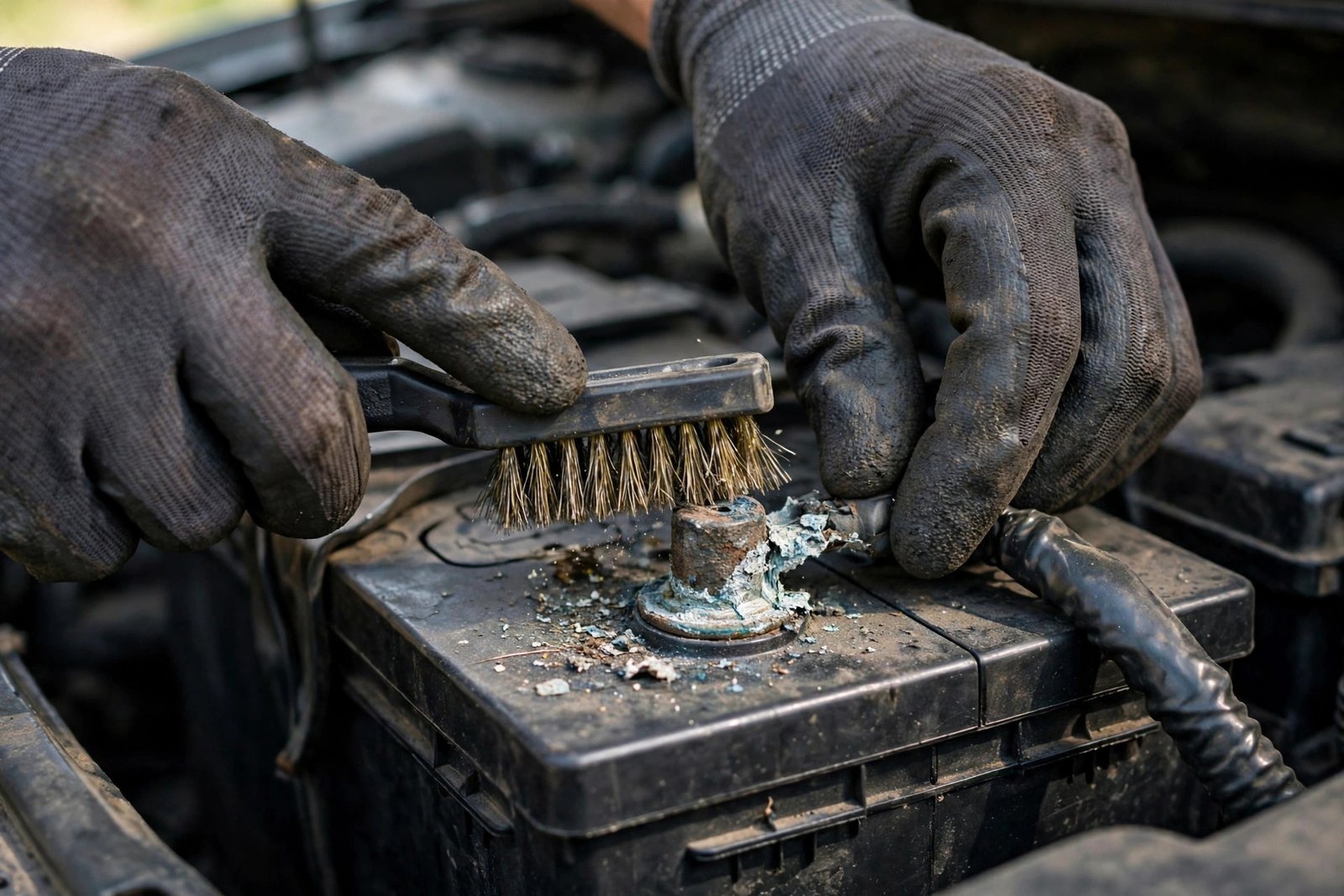
Step six: scrub the terminals and the clamps. Take your wire brush or your battery terminal brush and scrub the terminals firmly. Scrub the top of each terminal post, scrub around the sides, and scrub the base where the terminal meets the battery case. You are aiming for clean, shiny metal. The lead terminals are soft, so scrub firmly but do not gouge the metal or grind it away. Short, firm strokes work better than pressing as hard as you can. Then scrub the inside of each cable clamp — the part that grips the terminal — until it is clean and shiny too. This part matters just as much as the terminals, because the clamp is the other half of the connection. A clean terminal with a dirty clamp is still a poor connection. If the corrosion is thick and stubborn, apply more paste and scrub again. Keep going until the metal shines. It should look bright and silver-grey when you are done, not dull and crusty.
Step seven: rinse carefully. Now pour a small amount of your baking soda water solution over the terminals and the clamps to wash away the paste and the loosened corrosion. Pour slowly and carefully, and use only as much water as you need. You are rinsing the terminals, not washing the engine bay. Keep the water away from the rest of the engine as much as you can, and do not pour water into any openings on the top of the battery. Some batteries have small caps or vents on top — do not pour water into those, and do not remove them. Once you have rinsed, wipe everything with your clean, dry cloth. Wipe the terminals, wipe the clamps, wipe the top of the battery. Then wait. Let everything dry completely before you reconnect anything. You can leave the bonnet open for a few minutes and let the air dry it, or wipe it again with a dry cloth to be sure. Moisture left on the terminals is an open invitation for the corrosion to come straight back, so do not skip the drying.
Step eight: inspect before you reconnect. This is the step most people skip, and it is one of the most important. Look at the terminals closely now that they are clean. Are they solid, or are they loose and wobbly? Do they look thin or eaten away compared to how they should look? Is there a crack in the battery case around the base of the terminal? Look at the cable clamps too. Do they close tightly, or are they stretched and loose? Look at the cables themselves, especially the first few centimetres next to the clamp. Is the plastic coating cracked or swollen? Can you see green crust creeping down under the coating? Is the cable stiff and brittle instead of flexible? If any of these things are wrong, cleaning alone may not be enough, and you should read the sections later in this article about when the cable or the battery must be replaced. If everything looks solid, clean, and tight, you are ready to reconnect.
Step nine: reconnect the positive cable first. This is the reverse of the disconnection order, and it is just as important. Positive first, negative last. Place the positive clamp — the red one, the plus sign — back onto the positive terminal post. Push it down firmly so it sits all the way down on the post. Then tighten the nut with your spanner — turn it clockwise — until the clamp is tight. It should be snug and firm. You should not be able to twist the clamp around the terminal by hand. But do not over-tighten it. The terminals are made of soft lead, and if you tighten the nut too hard, you can crack the terminal or crush it out of shape. Snug and firm is right. If you have to force it, something is wrong — stop and look at it.
Step ten: reconnect the negative cable last. Place the negative clamp — the black one, the minus sign — back onto the negative terminal post. Push it down firmly, tighten the nut until it is snug, and check that it does not move when you try to twist it. Now both cables are back on, in the right order, on the right terminals. Double-check against the photo you took at the start. Red to positive, black to negative. If they match your photo, you have done it right.
Step eleven: protect the terminals. Take your petroleum jelly or your battery terminal grease and spread a thin layer over the top of each terminal and each clamp. You do not need a thick layer — just enough to cover the metal completely with a thin, even coating. This seals the clean metal away from the air and the acid vapour, and it slows the corrosion down dramatically. Some people also put a felt washer — a small ring that sits around the base of the terminal — under the clamp, and those help too, but the grease alone makes a big difference. If you used a spray-on protector, follow the instructions on the can and let it dry before you close the bonnet.
Step twelve: test and tidy up. Start the car. It should start more quickly and more strongly than before. Let it run for a few minutes and check that the lights are bright and the dashboard is steady. Switch the car off and start it again to be sure. Then close the bonnet, clean up your tools, and wash your hands thoroughly with soap and water — even though you wore gloves, wash your hands anyway. Dispose of the cloths and the used paste safely, and wash your gloves. Take another photo of the clean terminals with your phone, so you have a record of what they looked like today. In a couple of months, when you check them again, you will be able to compare and see whether the corrosion is coming back.
That is the whole job. Done properly, it takes around half an hour from start to finish, including the time you spend letting the paste work and letting everything dry. It is one of the most satisfying small jobs you can do on your car, because the difference is immediate: the car starts better, the lights are brighter, and you know you have fixed the problem yourself.
What NOT to Do: The Mistakes That Cause Damage or Injury
I have spent enough time fixing other people's battery jobs to know the common mistakes, and some of them are dangerous. So let me be direct about what you should never do when you are working on a car battery, even if you have seen someone else do it or read about it online.
Never work on a battery with bare hands when there is heavy build-up. The corrosion is acidic. It irritates the skin, it stings, and if you have any small cuts on your hands, it will find them. Always wear gloves. There is no reason not to — gloves are cheap, they are available everywhere in Dubai, and they protect you from the one thing on the battery that can hurt you just by touching it.
Never work without eye protection. I have said this already and I am saying it again, because it is the mistake I see most often. When you scrub a corroded terminal, small particles fly off. They are tiny, you can barely see them, and if one lands in your eye, it hurts. Safety glasses cost almost nothing. Wear them.
Never smoke, and never have any open flame or spark near the battery. This is not a small warning. Car batteries give off hydrogen gas, especially when they are charging or when they have just been used. Hydrogen is highly flammable, and it is invisible. A cigarette, a lighter, or even a spark from a tool can ignite it. The result can be a small explosion that sprays acid. I have never seen this happen in person, and I never want to. Keep all flames and sparks far away from the battery, and do not let anyone smoke near the car while you are working on it.
Never short the terminals. Shorting means connecting the positive and negative terminals to each other, directly or through a piece of metal — a spanner, a wire, a tool left across the top of the battery. This creates a massive rush of electricity that can melt the tool, burn you badly, damage the battery, and in the worst case, cause the battery to explode. This is why you disconnect the negative cable first, why you keep your tools away from the battery when you are not using them, and why you never lay a spanner down across the top of the battery. It sounds obvious, but it is one of the most common accidents, and it happens in a split second.
Never pour water directly onto the battery in large amounts, and never use a hose on the engine bay to clean the battery. A small, controlled rinse of the terminals is fine. Flooding the area with water is not. Water can get into the battery vents, it can get into electrical connectors nearby, and it can cause short circuits and corrosion in places you cannot see. Use a jug, pour slowly, and use only as much water as you need.
Never use a harsh chemical cleaner, a strong acid, or a solvent on the battery. Baking soda and water is the right cleaning combination. Strong chemicals can damage the battery case, damage the cables, and give off fumes you do not want to breathe. Stick to baking soda. It is cheap, it is safe, and it works.
Never hammer the cable clamp onto the terminal, and never use a screwdriver to force a clamp open or closed. The terminals are soft lead, the battery case is plastic, and both crack easily under force. If a clamp will not go on or come off, stop and look at why. It is usually because the clamp is corroded and swollen, or because it is the wrong size, or because there is a build-up of crust in the way. Forcing it will break something, and a cracked battery case is a much bigger problem than a stuck clamp.
Never disconnect the battery without knowing what it will affect in your car. On many modern cars, disconnecting the battery can reset the radio, the clock, the electric windows, and sometimes the onboard computer settings. On some cars, it can even affect the security system or the engine management settings. This is not a reason to avoid cleaning your terminals, but it is a reason to know your car. Check your owner's manual before you disconnect the battery. If your car has a radio code — a security code you need to enter to make the radio work again after the battery is disconnected — make sure you have that code written down before you start. If you are not sure, ask someone who knows your car, or call us and we will handle it. For most cars in Dubai, a battery disconnect is simple and nothing goes wrong. But for a few, it is worth checking first.
Never ignore a cracked, swollen, or leaking battery. I have said this three times now, and I will say it once more, because it is the most important warning in this article. If the battery case is cracked, if the sides are bulging outwards, if liquid is leaking from it, if it smells strongly of rotten eggs, or if you see melted plastic anywhere near it — stop, do not touch it, do not try to jump-start the car, and call for help. That battery needs to be handled by someone with the right equipment. Your safety is worth more than any car.
When Cleaning Is Not Enough
Cleaning is the right first step, and for most cars it is the only step needed. But there are times when you clean the terminals properly, the car starts well for a day or two, and then the problem comes straight back. Or you clean them and the car still struggles. Or you clean them and the build-up returns within a week, thicker than before. When that happens, cleaning is not enough, and you need to look deeper. Let me explain the signs that tell you the problem has gone past the surface.
The first sign is corrosion that keeps coming back quickly. If you clean the terminals thoroughly — properly clean, shiny metal, protective grease applied — and the white powder or green crust is back within a week or two, something is feeding it from inside. The most common cause is a battery that is leaking acid vapour from around the base of the terminal, where the terminal post passes through the battery case. Over time, the seal around the post weakens, especially in Dubai heat, and acid vapour escapes constantly. You can clean the outside as often as you like, but the vapour keeps coming, and the crust keeps growing. Another cause is a battery that is being overcharged by the charging system, which makes it produce more gas than normal. In both cases, the corrosion is a symptom of a deeper problem, and cleaning alone will never fix it. If the build-up returns fast after a proper clean, get the battery and the charging system tested.
The second sign is corrosion inside the cable. This is the hidden problem, and it is the one that catches most people by surprise. The thick cables that connect to your battery have copper wire inside them, covered by a plastic coating. When corrosion gets into the cable — usually through a crack in the coating near the clamp, or through the clamp itself — it travels along the copper wire underneath the plastic, where you cannot see it. From the outside, the cable looks fine. The terminal is clean. But inside, the copper has turned green and brittle, and the electricity cannot flow properly through it. I have cut open cables that looked perfectly normal on the outside and found green, powdery copper inside for several centimetres. The clue is usually this: the terminals are clean, the battery tests healthy, but the car still cranks slowly. Or the cable feels stiff and brittle near the clamp, instead of flexible. Or the plastic coating looks swollen or discoloured. If you suspect the corrosion has gone inside the cable, the cable needs to be replaced. No amount of cleaning the outside will fix what is happening on the inside.
The third sign is a terminal that will not stay tight. After cleaning, you tighten the clamp, and it feels snug. A few days later, it is loose again. Or you tighten it and it never really feels tight at all — it just keeps turning, or it feels like it is gripping nothing. This usually means the terminal post or the clamp has been eaten away by corrosion to the point where there is not enough metal left for a proper grip. The lead terminal is soft, and years of corrosion can eat it down until it is thinner than it should be. A loose connection is a poor connection, and it will cause exactly the same symptoms as corrosion: slow cranking, clicking, dim lights, flickering electrics. Tightening a clamp that has nothing left to grip is a waste of time. The terminal or the cable needs attention.
The fourth sign is visible damage to the cable or the terminal. Look for a clamp that is cracked, or a terminal post that is visibly thinner on one side, or a cable where the plastic coating has split open and you can see green wire inside. Look for a terminal that wobbles when you touch it — it should be solid and fixed firmly into the battery case. If it moves, the seal is broken and the battery is likely leaking vapour from around it. Look for any sign of melting or heat damage on the clamp or the cable. Heat damage means the connection has been getting hot because the electricity was struggling to get through, and that is a sign the connection has been poor for a long time.
The fifth sign is that cleaning helps, but only for a short time, and each time the improvement lasts for less time than before. The first clean lasts a month. The next clean lasts two weeks. The next one lasts a few days. This is the pattern of a connection that is slowly being eaten away. Each clean removes a little more metal along with the corrosion, and each time there is a little less metal left to make a good connection. Eventually there is not enough left, and cleaning stops helping at all. If you recognise this pattern in your car, do not keep cleaning and hoping. Get the cable and the battery checked properly, and be prepared for a replacement.
I know this section might sound discouraging, but it is actually good news in disguise. Knowing when cleaning is not enough saves you from the frustration of cleaning the same terminals again and again and wondering why the car still struggles. It also saves you from replacing the battery when the real problem is the cable, or replacing the cable when the real problem is the battery. The next two sections will help you work out which one it is.
When the Cable Must Be Replaced
The battery cables are the thick wires that carry electricity between the battery and the rest of the car. There are two of them: the positive cable, which runs from the positive terminal to the starter motor and the fuse box, and the negative cable, which runs from the negative terminal to the body of the car and the engine. They are simple parts, but they carry an enormous amount of electricity, and when they go bad, everything suffers. Here is how you know when a cable has reached the end of its life.
The clearest sign is a cable that is eaten through, or nearly eaten through, by corrosion. This usually happens at the end near the battery clamp, where the acid vapour is strongest. The copper wire inside the cable turns green, becomes brittle, and eventually breaks apart. You might see green crust creeping down the cable under the plastic coating, or the coating might look swollen and puffy, or you might be able to feel that the cable is stiff and crunchy when you bend it gently near the clamp, instead of smooth and flexible. If you cut the coating back a little — and only a mechanic should do this, because it is easy to make things worse — you would see green powder instead of clean copper wire. A cable in this condition cannot carry electricity properly, and it will not get better. It must be replaced.
Another clear sign is a terminal clamp that is broken, cracked, or so corroded that it cannot grip the terminal post tightly. The clamp is the metal ring at the end of the cable that fits over the battery terminal. It needs to close firmly around the post and hold it tight. If the clamp is cracked, if the bolt that tightens it is stripped and will not tighten, if the clamp is stretched so wide that it will not close around the post, or if the metal is so eaten away that it is thin and fragile, the clamp has failed. Sometimes you can replace just the clamp, and sometimes the whole cable needs to be replaced along with it. It depends on the car and on how far the corrosion has travelled down the cable. A good mechanic will check the cable, not just the clamp, before deciding.
A third sign is a cable that gets hot. After a drive, or after trying to start the car a few times, touch the battery cable gently near the clamp — carefully, and only if it is safe to do so. If it feels noticeably warm or hot, while the rest of the cable feels cool, that is a warning sign. Heat in a cable means resistance, and resistance means the electricity is struggling to get through a damaged or corroded section. A healthy cable should not get hot. A hot cable is a cable that is failing, and it should be replaced before it causes more damage. I should add a warning here: if the cable is very hot, or if you see any smoke or smell burning, do not touch it and do not keep trying to start the car. Call for help.
A fourth sign is a cable with damaged insulation — the plastic coating that covers the wire. If the coating is cracked, split, melted, or worn through so that you can see the wire inside, the cable is no longer protected. Moisture and acid vapour can get in through the damage, corrosion can spread along the wire, and in the worst case, the exposed wire can touch metal parts of the car and cause a short circuit. A cable with damaged insulation near the battery should be replaced, not taped up. Tape is a temporary fix for a wire in the middle of nowhere, not for a battery cable carrying the full starting current of your car.
When a cable is replaced, the new cable must be the right one for your car. Battery cables are not all the same. They have different lengths, different thicknesses, and different clamp sizes. A cable that is too thin cannot carry enough electricity to start the engine properly, and it will get hot. A cable that is too short will be stretched tight and will pull on the terminal. A good mechanic will fit the correct cable for your car, with clean connections at both ends — not just at the battery, but at the other end too, where it connects to the starter motor or to the body of the car. Those connections can corrode as well, and a proper cable replacement includes checking and cleaning them.
If you think your cables might need replacing, our car repair and maintenance services cover this kind of work, and we can check the cables properly, test the battery, and tell you honestly whether the cable is the problem or whether something else is going on. A cable replacement is a straightforward job for a mechanic, but it is not a job I recommend doing yourself unless you know exactly what you are doing, because the cables run through tight spaces in the engine bay and the connections at the other end are not always easy to reach.
When the Battery Itself Must Be Replaced
Sometimes the terminals are clean, the cables are healthy, and the car still will not start properly. Sometimes the corrosion keeps coming back no matter what you do. Sometimes the battery is simply worn out. Knowing when the battery itself is the problem — rather than the terminals or the cables — will save you from chasing the wrong fix.
The first sign is age. In Dubai, most car batteries last around two to three years because of the constant heat. Some last longer, especially if the car is driven regularly and the charging system is healthy. Some fail sooner. But if your battery is more than three years old, and it is struggling to start the car, and the terminals are clean, age is a strong suspect. Batteries do not last forever. Inside, the plates wear out, the acid weakens, and the battery slowly loses its ability to hold a charge. There is no cleaning or repair that brings a worn-out battery back to life. When it is done, it is done.
The second sign is a battery that will not hold a charge. You jump-start the car, you drive it for a good long run, and the next morning it is flat again. Or you charge the battery fully, and a day later it is weak again, even though nothing was left on in the car. A healthy battery holds its charge when it is not being used. A worn-out battery loses it, slowly but steadily, because the internal parts can no longer store electricity properly. If this is happening to your car, and the terminals and cables are clean and tight, the battery is the most likely cause.
The third sign is a swollen or cracked battery case. Heat can make a battery swell, and overcharging can make it swell too. If the sides of the battery are bulging outwards, or the top is raised, or you can see cracks in the plastic case, the battery is damaged and it needs to be replaced. Do not try to clean or repair a battery in this condition. Do not try to jump-start the car. Call for help and let a mechanic handle it safely.
The fourth sign is a battery that leaks. If you see liquid around the base of the battery, or on the tray it sits on, or if the top of the battery is wet when it should be dry, the battery is leaking acid. This is not something to clean up yourself with a cloth. Battery acid is corrosive, it damages paint and metal, and it can burn your skin. A leaking battery needs to be replaced, and the area around it needs to be cleaned properly by someone with the right equipment.
The fifth sign is a battery that fails a proper test. This is the most reliable sign of all, because it is not a guess — it is a measurement. A battery tester checks the voltage and the health of the battery, and it gives a clear result: good, weak, or failed. If you have cleaned the terminals, checked the cables, and the battery still tests weak or failed, there is no argument left. The battery needs replacing. I always test before I replace, and you should expect the same from any mechanic. If someone tells you the battery needs replacing without testing it, ask them to show you the test result.
When the battery does need replacing, it is important to fit the right battery for your car. Batteries come in different sizes, different capacities, and different terminal positions. Fitting the wrong battery can cause problems with the clamp, the cables, and the charging system. A good mechanic will check your car's requirements and fit the correct battery, with clean terminals, tight connections, and protective grease applied from the start. If you need a new battery fitted at your home or office, our car battery replacement in Dubai service covers the whole city, and we test first and replace only when the test shows it is needed.
How to Stop Corrosion Coming Back
Cleaning the terminals is only half the job. The other half is stopping the crust from growing back, and that is where most people give up too early. They clean the terminals, they feel good about it, and then they forget about the battery for a year. A year later, the crust is back, thicker than before. Prevention is not difficult, but it does need a little routine. Here is what actually works.
The most important habit is regular checking. In Dubai, check your battery terminals at least once every two months, and once a month during the peak summer. It takes less than a minute. Lift the bonnet, look at the two terminals, and ask yourself whether there is any white powder or green crust. If the metal is clean and shiny, close the bonnet. If there is a light dusting, wipe it off and apply a little more protective grease. Catching it early is the whole secret, because a thin dusting is easy to deal with and a thick crust is not.
The second habit is protective grease. After every clean, apply a thin layer of petroleum jelly or battery terminal grease to the terminals and the clamps. This is the single most effective thing you can do to slow corrosion down. The grease seals the clean metal away from the air and the acid vapour, and it breaks the chain of the chemical reaction. Without grease, the corrosion starts again immediately. With grease, it is slowed down dramatically. It is a small step, it costs almost nothing, and it makes a real difference. Do not skip it.
The third habit is keeping the top of the battery clean and dry. Dust, moisture, and spilled liquid on top of the battery create a path for electricity to leak slowly across the top of the battery, and that slow leak encourages corrosion. Wipe the top of the battery with a dry cloth when you check the terminals. If there is any liquid on top of the battery, wipe it off carefully — with gloves on — and find out where it came from. A clean, dry battery top is a healthier battery.
The fourth habit is keeping the clamps tight. A loose clamp is a poor connection, and a poor connection runs hotter and corrodes faster. Every time you check the terminals, give each clamp a gentle twist with your hand. If it moves, it needs tightening. Do not over-tighten it — snug and firm is right — but do not leave it loose either. A clamp that keeps coming loose may be stretched or damaged, and if it is, it needs replacing.
The fifth habit is about how you use the car. If your car sits parked for weeks at a time, the battery slowly discharges and corrosion grows faster. If you are going away, ask someone to start the car and let it run for a while every week or so, or have the battery checked when you come back. If your driving is mostly short trips, try to take the car for a longer drive now and then — a proper run on the highway gives the alternator time to fully recharge the battery, and a fully charged battery corrodes more slowly than one that is always slightly undercharged. You do not need to change your life for your battery, but a little awareness of how you use the car goes a long way.
The sixth habit is to have the battery and the charging system checked as part of your regular car service. When your car goes in for a minor vs major car service, ask the mechanic to check the battery terminals, the cables, and the charging system. It takes a few minutes, and it catches problems before they leave you stranded. A good service is not just about oil and filters — it is about checking the whole car, and the battery is part of that.
Finally, if your battery is old and the corrosion keeps coming back no matter what you do, accept that the battery may be reaching the end of its life. Prevention works best on a healthy battery. On a battery that is leaking vapour from around the terminals because the seals have failed, no amount of grease will hold the corrosion back for long. In that case, the honest answer is a new battery, fitted properly, with clean terminals and protective grease from day one. That is not a failure of prevention — it is prevention working properly, because you caught the problem before it left you stranded.
Checking the Charging System
There is one more part of this story that most articles about battery corrosion leave out, and it is the charging system. Your battery does not work alone. It is part of a system that includes the alternator, which recharges the battery while you drive, and the voltage regulator, which controls how much charge the alternator sends to the battery. If the charging system is not working properly, it can cause corrosion, and it can also make corrosion worse. So if you have cleaned the terminals and the problem keeps coming back, the charging system is the next thing to check.
The alternator is a small generator driven by the engine. While the engine runs, the alternator produces electricity, which powers the car's electrics and recharges the battery at the same time. If the alternator is failing, the battery never gets fully recharged, and a battery that is always slightly flat corrodes more quickly. If the alternator is overcharging — sending too much power to the battery — the battery produces more gas, and more gas means more acid vapour, and more acid vapour means more corrosion. Both problems, undercharging and overcharging, show up as corrosion on the terminals, which is why checking the charging system matters.
How do you know if the charging system is the problem? The symptoms overlap with everything else in this article — slow cranking, dim lights, a battery that keeps going flat — so you cannot diagnose it by symptoms alone. You need a test. The basic test is simple: a mechanic connects a multimeter to the battery terminals while the engine is running, and checks the voltage. With the engine running, the voltage should be higher than when the engine is off, because the alternator is charging the battery. If the voltage is too low, the alternator may not be charging properly. If it is too high, the alternator may be overcharging. Either way, the charging system needs attention.
A more thorough test checks the alternator under load — with the headlights on, the air conditioning running, and the engine at different speeds — to see whether it can keep up when the car is asking for a lot of electricity. This is the kind of test a mechanic does with proper equipment, and it takes only a few minutes. It is worth doing if you have replaced the battery and the problem came back, or if you have cleaned the terminals several times and the corrosion keeps returning quickly.
There is another part of the charging system worth mentioning: the drive belt. The alternator is driven by a belt connected to the engine, and if that belt is worn, loose, or slipping, the alternator cannot spin properly and cannot charge the battery properly. A squealing noise from the engine bay, especially when you first start the car or when you switch the air conditioning on, can be a sign of a worn belt. It is a simple thing to check, and it is part of a proper service. If the belt is the problem, replacing it is a straightforward job, and it fixes the charging problem at its root.
I am not telling you all of this so you can test the charging system yourself. I am telling you so that when a mechanic says the charging system needs checking, you understand why, and so that you do not keep replacing batteries when the real problem is the alternator. A new battery on a car with a failing alternator will go flat again, and the terminals will corrode again, because the root cause was never fixed. Test the system, fix what is actually faulty, and the whole car works better.
Mistakes to Avoid
I have covered the big safety mistakes already, but there are smaller mistakes that I see again and again, and they are worth listing in one place so you can avoid them. None of them will hurt you, but all of them will cost you time, money, or a car that still does not start properly.
The first mistake is cleaning the terminals without disconnecting the cables. Some people try to scrub the terminals with the cables still connected, because they do not want to lose their radio settings or they think it is quicker. It is not quicker, and it is not safe. You cannot clean the inside of the clamp properly while it is on the terminal, and you cannot see whether the corrosion has gone inside the cable. Worse, your wire brush can easily touch both terminals at once, or touch the terminal and the metal body of the car, and cause a short circuit. Always disconnect the cables first. It takes a minute, and it is the right way to do the job.
The second mistake is reconnecting the cables in the wrong order, or on the wrong terminals. Negative first when you disconnect, positive first when you reconnect. Red to positive, black to negative. It sounds simple, and it is simple, but it is also the mistake that causes the most expensive damage. Connecting the battery the wrong way round can blow fuses, damage the alternator, and damage the car's electronics. Take the photo before you start. Check it before you reconnect. There is no excuse for getting this wrong when a photo costs five seconds.
The third mistake is over-tightening the clamps. The terminals are soft lead, and the nuts are small. If you tighten them with all your strength, you can crack the terminal, crush it out of shape, or strip the nut so it will not tighten properly next time. Snug and firm is enough. If the clamp still moves after you have tightened it firmly, the problem is not that you have not tightened it enough — the problem is that the clamp or the terminal is worn out, and tightening harder will only make it worse.
The fourth mistake is using the wrong cleaning products. I have seen people use strong household cleaners, vinegar, and even fizzy drinks to clean battery terminals. Some of these are acidic, which makes the problem worse. Some leave a sticky residue that attracts dust and moisture. Baking soda and water is the right combination. It is cheap, it is safe, and it neutralises the acid instead of adding to it. Stick to it.
The fifth mistake is forgetting the protective grease. Cleaning without protecting is the most common mistake of all, and it is the reason so many people say that cleaning does not work. It does work — but only if you protect the clean metal afterwards. Without grease, the corrosion starts again immediately. With grease, you buy yourself months of clean terminals. It is a one-minute step. Do not skip it.
The sixth mistake is assuming a new battery will fix corroded cables. I have seen this many times: the driver buys a new battery, the mechanic fits it onto the old corroded cables, and a few weeks later the car is struggling again. The battery was never the problem. The cables were. Always check the terminals and the cables before you replace the battery, and always clean or replace them as part of a battery replacement. A new battery deserves clean connections.
The seventh mistake is ignoring the problem until the car will not start. Corrosion gives you plenty of warning — the slow crank, the dim lights, the crust you can see with your own eyes. Ignoring those warnings does not make the problem go away. It makes the fix more expensive, because by the time the car will not start, the corrosion has often gone inside the cable or eaten the terminal down to the point where parts need replacing. Check your terminals regularly. It takes a minute, and it saves you from a morning without a car.
Frequently Asked Questions
What is the white powder on my car battery terminals?
The white powder is corrosion, and it is a lead compound that forms when acid vapour escapes from inside the battery and reacts with the lead metal of the terminal. It usually appears on the negative terminal, the one with the minus sign and the black cover. It looks like white dust or white flakes, and it can grow into a thick crust if it is left alone. It is not dirt from the road and it is not mould. It is a chemical reaction, and it is very common in Dubai because the heat speeds the reaction up. In small amounts it is not dangerous just by being there, but it is acidic, so you should not touch it with bare hands, and you should wear gloves and eye protection when you clean it. The white powder sits between the terminal and the cable clamp and blocks the flow of electricity, which is why it causes slow cranking, clicking, and dim lights. Cleaning it off with baking soda and water, and then protecting the clean metal with a thin layer of petroleum jelly, will fix the problem in most cases.
What is the green build-up on my car battery terminals?
The green or blue-green build-up is also corrosion, but it comes from a different reaction. While the white powder comes from the acid reacting with the lead in the terminal, the green crust comes from the acid reacting with the copper in the battery cable. It usually appears on the positive terminal, the one with the plus sign and the red cover. The green colour is the same kind of change you see when copper is left outside for a long time and turns green. When the green starts creeping down the cable, away from the terminal and under the plastic coating, it is a warning that the corrosion has gone inside the cable, where you cannot see it. Green build-up on the surface can be cleaned in the same way as white build-up, with baking soda and water and a wire brush. But if the green has travelled inside the cable, cleaning the outside will not fix it, and the cable will need to be replaced.
Can I clean corroded battery terminals myself?
Yes, in most cases you can, and this article walks you through the whole process step by step. You need gloves, eye protection, baking soda, clean water, a wire brush, the right spanner for the terminal nuts, a clean dry cloth, and some petroleum jelly for protection afterwards. The most important rules are: disconnect the negative cable first and reconnect it last, never smoke or have any flame or spark near the battery, never let a tool touch both terminals at once, and never work on a battery that is cracked, swollen, or leaking. If you follow the steps carefully, the job is straightforward and the difference is immediate — the car starts better and the lights are brighter. But if you are not comfortable working on the car, or if the battery looks damaged, or if you are not sure which cable goes where, there is no shame in calling a mechanic. We clean terminals as part of our battery service, and we would rather do a simple job for you than see you hurt yourself trying to save a small amount of trouble.
How do I know if my battery is dead or just corroded?
Start by looking at the terminals. If you can see white powder or green crust, corrosion is at least part of the problem, and you should clean the terminals properly before you judge anything else. Then look at how the lights behave: if the lights are reasonably bright when you first switch them on, but go very dim the moment you try to start the engine, that points to a connection problem. If the lights are very dim from the start, or they do not come on at all, the battery itself is more likely to be flat or dead. Think about the age of the battery too — in Dubai, most batteries last around two to three years, so a battery older than that is more likely to be genuinely worn out. The most reliable way to tell is a proper battery test with a battery tester or a multimeter, which can tell you in less than a minute whether the battery is healthy, weak, or dead. The best approach is to clean the terminals first, then see how the car behaves for a few days. If it starts strongly and the problem is gone, it was the corrosion. If it still struggles after a proper clean, get the battery and the charging system tested.
How often should I check my battery terminals in Dubai?
In Dubai, I recommend checking your battery terminals at least once every two months, and once a month during the peak summer, when the heat is at its worst. It takes less than a minute — just lift the bonnet and look at the two terminals. If the metal is clean and shiny, close the bonnet and carry on. If there is a light dusting of white powder or a small amount of green crust, clean it off and apply a little more protective grease. Checking regularly is the whole secret to this problem, because corrosion builds up slowly and a thin dusting cleans off in minutes, while a thick crust that has been growing for a year is a much bigger job. If your car sits parked for weeks at a time, or if your driving is mostly short trips, check more often, because both of those patterns make corrosion grow faster. Make it part of your routine, the same way you check your fuel or your tyre pressure, and you will rarely be caught out by a car that will not start.
What happens if I ignore corroded battery terminals?
If you ignore them, the corrosion keeps growing, slowly at first and then faster as the build-up gets thicker. The car starts more slowly each morning, the lights get dimmer, the electrics start flickering, and one day the car will not start at all — usually on the morning you need it most, or after you have stopped somewhere and need to get home. Ignoring the problem also makes the fix more expensive, because the longer the corrosion sits there, the more likely it is to travel inside the cable, where it eats away at the copper wire underneath the plastic coating. Once that happens, cleaning the terminals is not enough and the cable needs to be replaced. In extreme cases, a loose and corroded connection can get hot, and that heat can damage the cable or the battery. The good news is that all of this is avoidable. A quick check every couple of months and a simple clean when you see build-up will keep the problem small and the fix cheap. Ignoring it is the one choice that guarantees a bigger bill later.
Can corroded terminals drain my car battery?
Corroded terminals do not drain the battery in the same way that leaving the lights on does, but they can make the battery go flat in a different way. The alternator — the part that recharges the battery while you drive — sends its charge back into the battery through the same terminals. If the terminals are corroded, the charge cannot get into the battery properly. You drive for an hour, but the battery only receives part of the charge it should have received. Over days and weeks, the battery gets weaker and weaker, not because it is faulty, but because it is never being fully recharged. At the same time, a crusty build-up on top of the battery can create a small path for electricity to leak slowly across the top of the battery, which also drains it over time. So while corrosion does not drain the battery overnight the way a light left on would, it does weaken the battery over time, and it is one of the reasons a car with corroded terminals can go flat again and again even after a jump-start. Cleaning the terminals and keeping them protected fixes both of these problems.
When should I replace the battery cable instead of cleaning it?
You should replace the cable when cleaning no longer fixes the problem. The clearest signs are: the corrosion keeps coming back within a week or two of a proper clean; the green crust has crept down the cable under the plastic coating; the cable feels stiff, brittle, or crunchy near the clamp instead of smooth and flexible; the plastic coating is cracked, swollen, or split open and you can see green wire inside; the clamp is cracked, stretched, or so eaten away that it will not grip the terminal tightly no matter how much you tighten it; or the cable gets noticeably warm or hot near the clamp after driving or after trying to start the car. Any one of these signs means the cable has been damaged beyond what cleaning can fix. A new cable must be the right size and length for your car, and it should be fitted with clean connections at both ends, not just at the battery. If you are not sure whether your cable needs replacing, have it checked by a mechanic — it is a quick inspection, and it will save you from replacing a battery that was never the problem.
Call 95 Services
If your car will not start, if the terminals are covered in thick crust, if the corrosion keeps coming back, or if you would simply rather have a mechanic handle it, call 95 Services on +971 54 344 3513. We are a mobile car repair service, and we come to you — at your home, your office, or wherever your car is parked — anywhere in the complete UAE. Our response time is 15–20 minutes, and help can arrive within 20 minutes, so you are not left waiting around wondering when someone will turn up.
When we arrive, we will look at the battery terminals, clean them properly if that is what is needed, test the battery to see whether it is healthy or worn out, check the cables for hidden corrosion, and check the charging system if the problem keeps coming back. We only replace what actually needs replacing. If a clean is all your car needs, that is all we will do. If the cable is eaten through, we will tell you plainly. If the battery has reached the end of its life, we will fit the right one for your car, with clean terminals and protective grease from the start.
Our prices are very low, and our service is honest and straightforward. You do not need to tow the car to a workshop, you do not need to wait in a queue, and you do not need to guess what is wrong. Just call +971 54 344 3513, tell us what is happening with your car, and we will come to you and sort it out. Whether it is a simple terminal clean, a new cable, or a new battery, we will get you moving again.
